
25 Air-gapped deployments with Edge Image Builder #
25.1 Intro #
This guide will show how to deploy several of the SUSE Edge components completely air-gapped on SUSE Linux Micro 6.2 utilizing Edge Image Builder(EIB) (Chapter 8, Edge Image Builder). With this, you’ll be able to boot into a customized, ready to boot (CRB) image created by EIB and have the specified components deployed on either a RKE2 or K3s cluster without an Internet connection or any manual steps. This configuration is highly desirable for customers that want to pre-bake all artifacts required for deployment into their OS image, so they are immediately available on boot.
We will cover an air-gapped installation of:

EIB will parse and pre-download all images referenced in the provided Helm charts and Kubernetes manifests. However, some of those may be attempting to pull container images and create Kubernetes resources based on those at runtime. In these cases we have to manually specify the necessary images in the definition file if we want to set up a completely air-gapped environment.
25.2 Prerequisites #
If you’re following this guide, it’s assumed that you are already familiar with EIB (Chapter 8, Edge Image Builder). If not, please follow the quick start guide (Chapter 2, Standalone clusters with Edge Image Builder) to better understand the concepts shown in practice below.
25.3 Libvirt Network Configuration #

To demo the air-gapped deployment, this guide will be done using a simulated air-gapped libvirt network and the following configuration will be tailored to that. For your own deployments, you may have to modify the host1.local.yaml configuration that will be introduced in the next step.
If you would like to use the same libvirt network configuration, follow along. If not, skip to Section 25.4, “Base Directory Configuration”.
Let’s create an isolated network configuration with an IP address range 192.168.100.2/24 for DHCP:
cat << EOF > isolatednetwork.xml
<network>
  <name>isolatednetwork</name>
  <bridge name='virbr1' stp='on' delay='0'/>
  <ip address='192.168.100.1' netmask='255.255.255.0'>
    <dhcp>
      <range start='192.168.100.2' end='192.168.100.254'/>
    </dhcp>
  </ip>
</network>
EOF
Now, the only thing left is to create the network and start it:
virsh net-define isolatednetwork.xml
virsh net-start isolatednetwork
25.4 Base Directory Configuration #
The base directory configuration is the same across all different components, so we will set it up here.
We will first create the necessary subdirectories:
export CONFIG_DIR=$HOME/config
mkdir -p $CONFIG_DIR/base-images
mkdir -p $CONFIG_DIR/network
mkdir -p $CONFIG_DIR/kubernetes/helm/values
Make sure to add whichever base image you plan to use into the base-images directory. This guide will focus on the Self Install ISO found here.
Let’s copy the downloaded image:
cp SL-Micro.x86_64-6.2-Base-SelfInstall-GM.install.iso $CONFIG_DIR/base-images/slemicro.isoEIB is never going to modify the base image input.
Let’s create a file containing the desired network configuration:
cat << EOF > $CONFIG_DIR/network/host1.local.yaml
routes:
  config:
  - destination: 0.0.0.0/0
    metric: 100
    next-hop-address: 192.168.100.1
    next-hop-interface: eth0
    table-id: 254
  - destination: 192.168.100.0/24
    metric: 100
    next-hop-address: 192.168.122.1
    next-hop-interface: eth0
    table-id: 254
dns-resolver:
  config:
    server:
    - 192.168.100.1
    - 8.8.8.8
interfaces:
- name: eth0
  type: ethernet
  state: up
  mac-address: 34:8A:B1:4B:16:E7
  ipv4:
    address:
    - ip: 192.168.100.50
      prefix-length: 24
    dhcp: false
    enabled: true
  ipv6:
    enabled: false
EOF
This configuration ensures the following are present on the provisioned systems (using the specified MAC address):
an Ethernet interface with a static IP address
routing
DNS
hostname (
host1.local)
The resulting file structure should now look like:
├── kubernetes/
│   └── helm/
│       └── values/
├── base-images/
│   └── slemicro.iso
└── network/
    └── host1.local.yaml
25.5 Base Definition File #
Edge Image Builder is using definition files to modify the SUSE Linux Micro images. These files contain the majority of configurable options. Many of these options will be repeated across the different component sections, so we will list and explain those here.

Full list of customization options in the definition file can be found in the upstream documentation
We will take a look at the following fields which will be present in all definition files:
apiVersion: 1.3
image:
  imageType: iso
  arch: x86_64
  baseImage: slemicro.iso
  outputImageName: eib-image.iso
operatingSystem:
  users:
    - username: root
      encryptedPassword: $6$jHugJNNd3HElGsUZ$eodjVe4te5ps44SVcWshdfWizrP.xAyd71CVEXazBJ/.v799/WRCBXxfYmunlBO2yp1hm/zb4r8EmnrrNCF.P/
kubernetes:
  version: v1.36.3+rke2r1
embeddedArtifactRegistry:
  images:
    - ...
The image section is required, and it specifies the input image, its architecture and type, as well as what the output image will be called.
The operatingSystem section is optional, and contains configuration to enable login on the provisioned systems with the root/eib username/password.
The kubernetes section is optional, and it defines the Kubernetes type and version. We are going to use the RKE2 distribution. Use kubernetes.version: v1.36.3+k3s1 if K3s is desired instead. Unless explicitly configured via the kubernetes.nodes field, all clusters we bootstrap in this guide will be single-node ones.
The embeddedArtifactRegistry section will include all images which are only referenced and pulled at runtime for the specific component.
25.6 Rancher Installation #
The Rancher (Chapter 4, Rancher) deployment that will be demonstrated will be highly slimmed down for demonstration purposes. For your actual deployments, additional artifacts may be necessary depending on your configuration.
The Rancher 2.15.1 release assets contain a rancher-images.txt file which lists all the images required for an air-gapped installation.
There are over 600 container images in total which means that the resulting CRB image would be roughly 30GB. For our Rancher installation, we will strip down that list to the smallest working configuration. From there, you can add back any images you may need for your deployments.
We will create the definition file and include the stripped down image list:
apiVersion: 1.3
image:
  imageType: iso
  arch: x86_64
  baseImage: slemicro.iso
  outputImageName: eib-image.iso
operatingSystem:
  users:
    - username: root
      encryptedPassword: $6$jHugJNNd3HElGsUZ$eodjVe4te5ps44SVcWshdfWizrP.xAyd71CVEXazBJ/.v799/WRCBXxfYmunlBO2yp1hm/zb4r8EmnrrNCF.P/
kubernetes:
  version: v1.36.3+rke2r1
  manifests:
    urls:
    - https://github.com/cert-manager/cert-manager/releases/download/v1.20.1/cert-manager.crds.yaml
  helm:
    charts:
      - name: rancher
        version: 2.15.1
        repositoryName: rancher-prime
        valuesFile: rancher-values.yaml
        targetNamespace: cattle-system
        createNamespace: true
        installationNamespace: kube-system
      - name: cert-manager
        installationNamespace: kube-system
        createNamespace: true
        repositoryName: jetstack
        targetNamespace: cert-manager
        version: 1.20.1
    repositories:
      - name: jetstack
        url: https://charts.jetstack.io
      - name: rancher-prime
        url: https://charts.rancher.com/server-charts/prime
embeddedArtifactRegistry:
  images:
    - name: registry.rancher.com/rancher/backup-restore-operator:v10.0.2
    - name: registry.rancher.com/rancher/compliance-operator:v1.4.1
    - name: registry.rancher.com/rancher/fleet-agent:v0.16.1
    - name: registry.rancher.com/rancher/fleet:v0.16.1
    - name: registry.rancher.com/rancher/hardened-addon-resizer:1.8.23-build20260717
    - name: registry.rancher.com/rancher/hardened-calico:v3.32.1-build20260722
    - name: registry.rancher.com/rancher/hardened-cluster-autoscaler:v1.10.3-build20260717
    - name: registry.rancher.com/rancher/hardened-cni-plugins:v1.9.1-build20260717
    - name: registry.rancher.com/rancher/hardened-coredns:v1.14.6-build20260722
    - name: registry.rancher.com/rancher/hardened-dns-node-cache:1.26.8-build20260722
    - name: registry.rancher.com/rancher/hardened-etcd:v3.6.14-k3s1-build20260723
    - name: registry.rancher.com/rancher/hardened-flannel:v0.28.8-build20260722
    - name: registry.rancher.com/rancher/hardened-k8s-metrics-server:v0.9.0-build20260722
    - name: registry.rancher.com/rancher/hardened-kubernetes:v1.36.3-rke2r1-build20260723
    - name: registry.rancher.com/rancher/hardened-multus-cni:v4.3.0-build20260722
    - name: registry.rancher.com/rancher/hardened-multus-dynamic-networks-controller:v0.3.8-build20260722
    - name: registry.rancher.com/rancher/hardened-multus-thick:v4.3.0-build20260722
    - name: registry.rancher.com/rancher/hardened-traefik:v3.7.8-build20260717
    - name: registry.rancher.com/rancher/hardened-whereabouts:v0.9.4-build20260721
    - name: registry.rancher.com/rancher/k3s-upgrade:v1.36.3-k3s1
    - name: registry.rancher.com/rancher/klipper-helm:v0.13.3-build20260727
    - name: registry.rancher.com/rancher/klipper-lb:v0.4.17
    - name: registry.rancher.com/rancher/kubectl:v1.35.2
    - name: registry.rancher.com/rancher/kuberlr-kubectl:v7.1.1
    - name: registry.rancher.com/rancher/local-path-provisioner:v0.0.36
    - name: registry.rancher.com/rancher/machine:v0.15.0-rancher142
    - name: registry.rancher.com/rancher/nginx-ingress-controller:v1.14.5-hardened2
    - name: registry.rancher.com/rancher/prom-prometheus:v3.8.1
    - name: registry.rancher.com/rancher/prometheus-federator:v6.0.0
    - name: registry.rancher.com/rancher/pushprox:v0.1.10
    - name: registry.rancher.com/rancher/rancher-agent:v2.15.1
    - name: registry.rancher.com/rancher/rancher-csp-adapter:v10.0.0
    - name: registry.rancher.com/rancher/rancher-webhook:v0.11.1
    - name: registry.rancher.com/rancher/rancher:v2.15.1
    - name: registry.rancher.com/rancher/remotedialer-proxy:v0.7.2
    - name: registry.rancher.com/rancher/rke2-cloud-provider:v1.36.2-0.20260610225606-10b320a3ba51-build20260709
    - name: registry.rancher.com/rancher/rke2-runtime:v1.36.3-rke2r1
    - name: registry.rancher.com/rancher/rke2-upgrade:v1.36.3-rke2r1
    - name: registry.rancher.com/rancher/scc-operator:v0.5.1
    - name: registry.rancher.com/rancher/security-scan:v0.9.1
    - name: registry.rancher.com/rancher/shell:v0.8.1
    - name: registry.rancher.com/rancher/supportability-review-app-frontend:v0.19.0
    - name: registry.rancher.com/rancher/supportability-review-internal:latest
    - name: registry.rancher.com/rancher/supportability-review-operator:v0.19.0
    - name: registry.rancher.com/rancher/supportability-review:latest
    - name: registry.rancher.com/rancher/system-agent-installer-k3s:v1.36.3-k3s1
    - name: registry.rancher.com/rancher/system-agent-installer-rke2:v1.36.3-rke2r1
    - name: registry.rancher.com/rancher/system-agent:v0.3.16-suc
    - name: registry.rancher.com/rancher/system-upgrade-controller:v0.20.1
    - name: registry.rancher.com/rancher/turtles:v0.27.1
    - name: registry.rancher.com/rancher/ui-plugin-catalog:4.15.0
    - name: registry.rancher.com/rancher/mirrored-ingress-nginx-kube-webhook-certgen:v1.6.7
As compared to the full list of 600+ container images, this slimmed down version only contains ~60 which makes the new CRB image only about 7GB.
We also need to create a Helm values file for Rancher:
cat << EOF > $CONFIG_DIR/kubernetes/helm/values/rancher-values.yaml
hostname: 192.168.100.50.sslip.io
replicas: 1
bootstrapPassword: "adminadminadmin"
systemDefaultRegistry: registry.rancher.com
useBundledSystemChart: true
EOFSetting the systemDefaultRegistry to registry.rancher.com allows Rancher to automatically look for images in the embedded artifact registry started within the CRB image at boot. Omitting this field may result in failure to find the container images on the node.
Let’s build the image:
podman run --rm -it --privileged -v $CONFIG_DIR:/eib \
registry.suse.com/edge/3.7/edge-image-builder:1.3.4 \
build --definition-file eib-iso-definition.yaml
The output should be similar to the following:
Downloading file: dl-manifest-1.yaml 100% |██████████████████████████████████████████████████████████████████████████████| (583/583 kB, 12 MB/s)
Pulling selected Helm charts... 100% |███████████████████████████████████████████████████████████████████████████████████████████| (2/2, 3 it/s)
Generating image customization components...
Identifier ................... [SUCCESS]
Custom Files ................. [SKIPPED]
Time ......................... [SKIPPED]
Network ...................... [SUCCESS]
Groups ....................... [SKIPPED]
Users ........................ [SUCCESS]
Proxy ........................ [SKIPPED]
Rpm .......................... [SKIPPED]
Os Files ..................... [SKIPPED]
Systemd ...................... [SKIPPED]
Fips ......................... [SKIPPED]
Elemental .................... [SKIPPED]
Suma ......................... [SKIPPED]
Populating Embedded Artifact Registry... 100% |███████████████████████████████████████████████████████████████████████████| (56/56, 8 it/min)
Embedded Artifact Registry ... [SUCCESS]
Keymap ....................... [SUCCESS]
Configuring Kubernetes component...
The Kubernetes CNI is not explicitly set, defaulting to 'cilium'.
Downloading file: rke2_installer.sh
Downloading file: rke2-images-core.linux-amd64.tar.zst 100% |███████████████████████████████████████████████████████████| (644/644 MB, 29 MB/s)
Downloading file: rke2-images-cilium.linux-amd64.tar.zst 100% |█████████████████████████████████████████████████████████| (400/400 MB, 29 MB/s)
Downloading file: rke2.linux-amd64.tar.gz 100% |███████████████████████████████████████████████████████████████████████████| (36/36 MB, 30 MB/s)
Downloading file: sha256sum-amd64.txt 100% |█████████████████████████████████████████████████████████████████████████████| (4.3/4.3 kB, 29 MB/s)
Kubernetes ................... [SUCCESS]
Certificates ................. [SKIPPED]
Cleanup ...................... [SKIPPED]
Building ISO image...
Kernel Params ................ [SKIPPED]
Build complete, the image can be found at: eib-image.iso
Once a node using the built image is provisioned, we can verify the Rancher installation:
/var/lib/rancher/rke2/bin/kubectl get all -n cattle-system --kubeconfig /etc/rancher/rke2/rke2.yamlThe output should be similar to the following, showing that everything has been successfully deployed:
NAME                                            READY   STATUS      RESTARTS   AGE
pod/helm-operation-6l6ld                        0/2     Completed   0          107s
pod/helm-operation-8tk2v                        0/2     Completed   0          2m2s
pod/helm-operation-blnrr                        0/2     Completed   0          2m49s
pod/helm-operation-hdcmt                        0/2     Completed   0          3m19s
pod/helm-operation-m74c7                        0/2     Completed   0          97s
pod/helm-operation-qzzr4                        0/2     Completed   0          2m30s
pod/helm-operation-s9jh5                        0/2     Completed   0          3m
pod/helm-operation-tq7ts                        0/2     Completed   0          2m41s
pod/rancher-99d599967-ftjkk                     1/1     Running     0          4m15s
pod/rancher-webhook-79798674c5-6w28t            1/1     Running     0          2m27s
pod/system-upgrade-controller-56696956b-trq5c   1/1     Running     0          104s

NAME                      TYPE        CLUSTER-IP     EXTERNAL-IP   PORT(S)          AGE
service/rancher           ClusterIP   10.43.255.80   <none>        80/TCP,443/TCP   4m15s
service/rancher-webhook   ClusterIP   10.43.7.238    <none>        443/TCP          2m27s

NAME                                        READY   UP-TO-DATE   AVAILABLE   AGE
deployment.apps/rancher                     1/1     1            1           4m15s
deployment.apps/rancher-webhook             1/1     1            1           2m27s
deployment.apps/system-upgrade-controller   1/1     1            1           104s

NAME                                                  DESIRED   CURRENT   READY   AGE
replicaset.apps/rancher-99d599967                     1         1         1       4m15s
replicaset.apps/rancher-webhook-79798674c5            1         1         1       2m27s
replicaset.apps/system-upgrade-controller-56696956b   1         1         1       104s
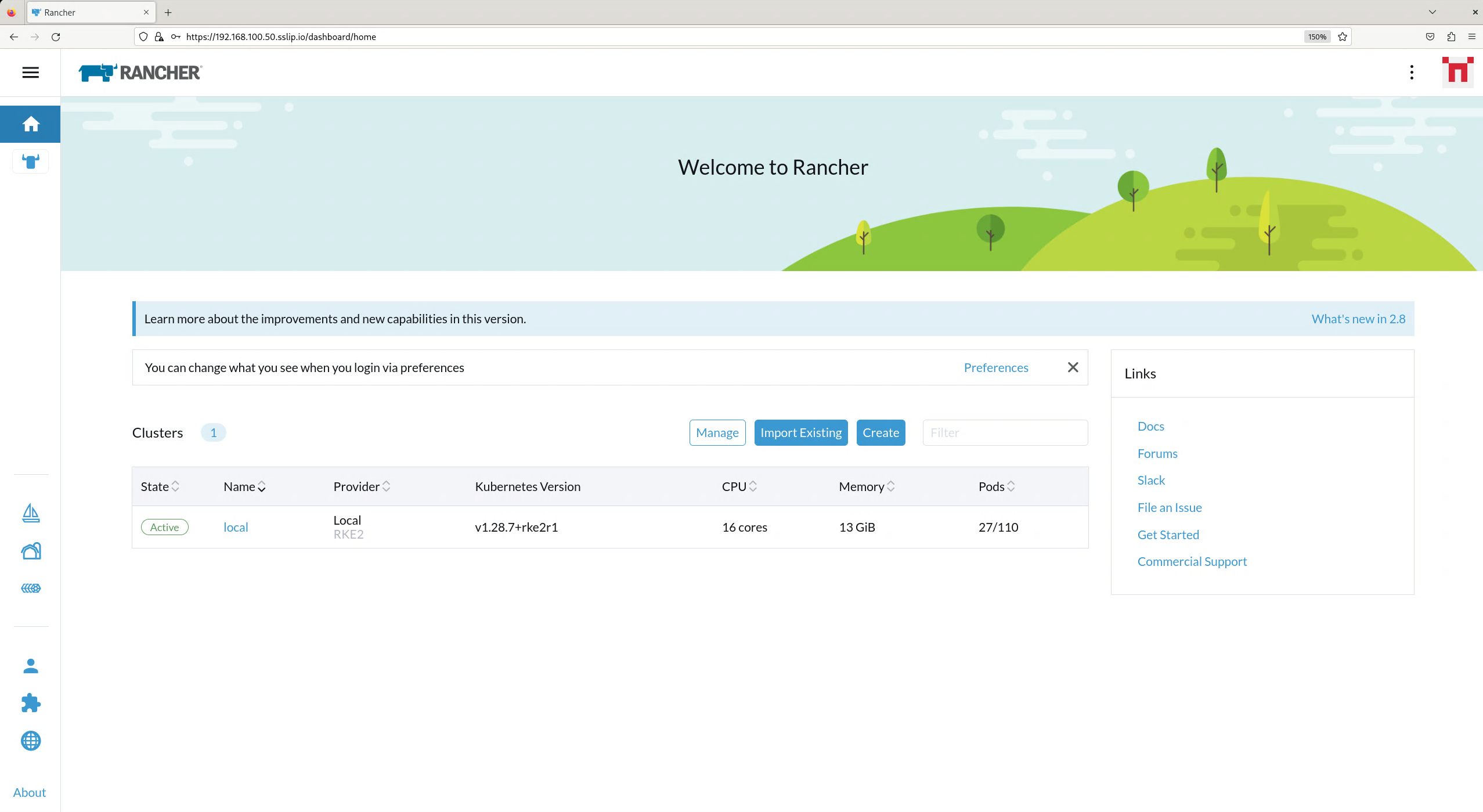
And when we go to https://192.168.100.50.sslip.io and log in with the adminadminadmin password that we set earlier, we are greeted with the Rancher dashboard:
25.7 SUSE Security Installation #
Unlike the Rancher installation, the SUSE Security installation does not require any special handling in EIB. EIB will automatically air-gap every image required by its underlying component NeuVector.
We will create the definition file:
apiVersion: 1.3
image:
  imageType: iso
  arch: x86_64
  baseImage: slemicro.iso
  outputImageName: eib-image.iso
operatingSystem:
  users:
    - username: root
      encryptedPassword: $6$jHugJNNd3HElGsUZ$eodjVe4te5ps44SVcWshdfWizrP.xAyd71CVEXazBJ/.v799/WRCBXxfYmunlBO2yp1hm/zb4r8EmnrrNCF.P/
kubernetes:
  version: v1.36.3+rke2r1
  helm:
    charts:
      - name: neuvector-crd
        version: 110.0.1+up2.11.1
        repositoryName: rancher-charts
        targetNamespace: neuvector
        createNamespace: true
        installationNamespace: kube-system
        valuesFile: neuvector-values.yaml
      - name: neuvector
        version: 110.0.1+up2.11.1
        repositoryName: rancher-charts
        targetNamespace: neuvector
        createNamespace: true
        installationNamespace: kube-system
        valuesFile: neuvector-values.yaml
    repositories:
      - name: rancher-charts
        url: https://charts.rancher.io/
We will also create a Helm values file for NeuVector:
cat << EOF > $CONFIG_DIR/kubernetes/helm/values/neuvector-values.yaml
controller:
  replicas: 1
manager:
  enabled: false
cve:
  scanner:
    enabled: false
    replicas: 1
k3s:
  enabled: true
crdwebhook:
  enabled: false
EOF
Let’s build the image:
podman run --rm -it --privileged -v $CONFIG_DIR:/eib \
registry.suse.com/edge/3.7/edge-image-builder:1.3.4 \
build --definition-file eib-iso-definition.yaml
The output should be similar to the following:
Pulling selected Helm charts... 100% |███████████████████████████████████████████████████████████████████████████████████████████| (2/2, 4 it/s)
Generating image customization components...
Identifier ................... [SUCCESS]
Custom Files ................. [SKIPPED]
Time ......................... [SKIPPED]
Network ...................... [SUCCESS]
Groups ....................... [SKIPPED]
Users ........................ [SUCCESS]
Proxy ........................ [SKIPPED]
Rpm .......................... [SKIPPED]
Os Files ..................... [SKIPPED]
Systemd ...................... [SKIPPED]
Fips ......................... [SKIPPED]
Elemental .................... [SKIPPED]
Suma ......................... [SKIPPED]
Populating Embedded Artifact Registry... 100% |██████████████████████████████████████████████████████████████████████████████| (5/5, 13 it/min)
Embedded Artifact Registry ... [SUCCESS]
Keymap ....................... [SUCCESS]
Configuring Kubernetes component...
The Kubernetes CNI is not explicitly set, defaulting to 'cilium'.
Downloading file: rke2_installer.sh
Kubernetes ................... [SUCCESS]
Certificates ................. [SKIPPED]
Cleanup ...................... [SKIPPED]
Building ISO image...
Kernel Params ................ [SKIPPED]
Build complete, the image can be found at: eib-image.iso
Once a node using the built image is provisioned, we can verify the SUSE Security installation:
/var/lib/rancher/rke2/bin/kubectl get all -n neuvector --kubeconfig /etc/rancher/rke2/rke2.yamlThe output should be similar to the following, showing that everything has been successfully deployed:
NAME                                            READY   STATUS      RESTARTS   AGE
pod/neuvector-cert-upgrader-job-bxbnz           0/1     Completed   0          3m39s
pod/neuvector-controller-pod-7d854bfdc7-nhxjf   1/1     Running     0          3m44s
pod/neuvector-enforcer-pod-ct8jm                1/1     Running     0          3m44s

NAME                                      TYPE        CLUSTER-IP      EXTERNAL-IP   PORT(S)                         AGE
service/neuvector-svc-admission-webhook   ClusterIP   10.43.234.241   <none>        443/TCP                         3m44s
service/neuvector-svc-controller          ClusterIP   None            <none>        18300/TCP,18301/TCP,18301/UDP   3m44s
service/neuvector-svc-crd-webhook         ClusterIP   10.43.50.190    <none>        443/TCP                         3m44s

NAME                                    DESIRED   CURRENT   READY   UP-TO-DATE   AVAILABLE   NODE SELECTOR   AGE
daemonset.apps/neuvector-enforcer-pod   1         1         1       1            1           <none>          3m44s

NAME                                       READY   UP-TO-DATE   AVAILABLE   AGE
deployment.apps/neuvector-controller-pod   1/1     1            1           3m44s

NAME                                                  DESIRED   CURRENT   READY   AGE
replicaset.apps/neuvector-controller-pod-7d854bfdc7   1         1         1       3m44s

NAME                                        SCHEDULE    TIMEZONE   SUSPEND   ACTIVE   LAST SCHEDULE   AGE
cronjob.batch/neuvector-cert-upgrader-pod   0 0 1 1 *   <none>     True      0        <none>          3m44s
cronjob.batch/neuvector-updater-pod         0 0 * * *   <none>     False     0        <none>          3m44s

NAME                                    STATUS     COMPLETIONS   DURATION   AGE
job.batch/neuvector-cert-upgrader-job   Complete   1/1           7s         3m39s
25.8 SUSE Storage Installation #
The official documentation for Longhorn contains a
longhorn-images.txt file which lists all the images required for an air-gapped installation.
We will be including their mirrored counterparts from the Rancher container registry in our definition file.
Let’s create it:
apiVersion: 1.3
image:
  imageType: iso
  arch: x86_64
  baseImage: slemicro.iso
  outputImageName: eib-image.iso
operatingSystem:
  users:
    - username: root
      encryptedPassword: $6$jHugJNNd3HElGsUZ$eodjVe4te5ps44SVcWshdfWizrP.xAyd71CVEXazBJ/.v799/WRCBXxfYmunlBO2yp1hm/zb4r8EmnrrNCF.P/
  packages:
    sccRegistrationCode: [reg-code]
    packageList:
      - open-iscsi
kubernetes:
  version: v1.36.3+rke2r1
  helm:
    charts:
      - name: suse-storage
        releaseName: longhorn
        repositoryName: rancher-application-collection
        targetNamespace: longhorn-system
        createNamespace: true
        version: 1.12.1
    repositories:
      - name: rancher-application-collection
        url: oci://dp.apps.rancher.io/charts
        authentication:
          username: $APPS.RANCHER.IO_USERNAME
          password: $APPS.RANCHER.IO_ACCESS_TOKEN
embeddedArtifactRegistry:
  registries:
    - uri: dp.apps.rancher.io
      authentication:
        username: $APPS.RANCHER.IO_USERNAME
        password: $APPS.RANCHER.IO_ACCESS_TOKEN
  images:
    - name: dp.apps.rancher.io/containers/kubernetes-csi-external-attacher:4.12.0-17.6
    - name: dp.apps.rancher.io/containers/kubernetes-csi-external-provisioner:5.3.0-17.8
    - name: dp.apps.rancher.io/containers/kubernetes-csi-external-resizer:2.2.1-10.8
    - name: dp.apps.rancher.io/containers/kubernetes-csi-external-snapshotter:8.6.0-17.6
    - name: dp.apps.rancher.io/containers/kubernetes-csi-livenessprobe:2.19.0-17.6
    - name: dp.apps.rancher.io/containers/kubernetes-csi-node-driver-registrar:2.17.0-17.6
    - name: dp.apps.rancher.io/containers/longhorn-backing-image-manager:1.12.1-1.5
    - name: dp.apps.rancher.io/containers/longhorn-engine:1.12.1-1.6
    - name: dp.apps.rancher.io/containers/longhorn-instance-manager:1.12.1-1.7
    - name: dp.apps.rancher.io/containers/longhorn-manager:1.12.1-1.5
    - name: dp.apps.rancher.io/containers/longhorn-share-manager:1.12.1-1.5
    - name: dp.apps.rancher.io/containers/longhorn-ui:1.12.1-1.3
- name: dp.apps.rancher.io/containers/rancher-support-bundle-kit:0.0.92-13.12You will notice that the definition file lists the open-iscsi package. This is necessary since Longhorn
relies on a iscsiadm daemon running on the different nodes to provide persistent volumes to Kubernetes.
Let’s build the image:
podman run --rm -it --privileged -v $CONFIG_DIR:/eib \
registry.suse.com/edge/3.7/edge-image-builder:1.3.4 \
build --definition-file eib-iso-definition.yaml
The output should be similar to the following:
Setting up Podman API listener...
Pulling selected Helm charts... 100% |██████████████████████████████████████████████████████████████████████████████████████████████████████████████████████████| (2/2, 3 it/s)
Generating image customization components...
Identifier ................... [SUCCESS]
Custom Files ................. [SKIPPED]
Time ......................... [SKIPPED]
Network ...................... [SUCCESS]
Groups ....................... [SKIPPED]
Users ........................ [SUCCESS]
Proxy ........................ [SKIPPED]
Resolving package dependencies...
Rpm .......................... [SUCCESS]
Os Files ..................... [SKIPPED]
Systemd ...................... [SKIPPED]
Fips ......................... [SKIPPED]
Elemental .................... [SKIPPED]
Suma ......................... [SKIPPED]
Populating Embedded Artifact Registry... 100% |███████████████████████████████████████████████████████████████████████████████████████████████████████████| (15/15, 20956 it/s)
Embedded Artifact Registry ... [SUCCESS]
Keymap ....................... [SUCCESS]
Configuring Kubernetes component...
The Kubernetes CNI is not explicitly set, defaulting to 'cilium'.
Downloading file: rke2_installer.sh
Downloading file: rke2-images-core.linux-amd64.tar.zst 100% (782/782 MB, 108 MB/s)
Downloading file: rke2-images-cilium.linux-amd64.tar.zst 100% (367/367 MB, 104 MB/s)
Downloading file: rke2.linux-amd64.tar.gz 100% (34/34 MB, 108 MB/s)
Downloading file: sha256sum-amd64.txt 100% (3.9/3.9 kB, 7.5 MB/s)
Kubernetes ................... [SUCCESS]
Certificates ................. [SKIPPED]
Cleanup ...................... [SKIPPED]
Building ISO image...
Kernel Params ................ [SKIPPED]
Build complete, the image can be found at: eib-image.iso
Once a node using the built image is provisioned, we can verify the Longhorn installation:
/var/lib/rancher/rke2/bin/kubectl get all -n longhorn-system --kubeconfig /etc/rancher/rke2/rke2.yamlThe output should be similar to the following, showing that everything has been successfully deployed:
NAME                                                    READY   STATUS    RESTARTS   AGE
pod/csi-attacher-787fd9c6c8-sf42d                       1/1     Running   0          2m28s
pod/csi-attacher-787fd9c6c8-tb82p                       1/1     Running   0          2m28s
pod/csi-attacher-787fd9c6c8-zhc6s                       1/1     Running   0          2m28s
pod/csi-provisioner-74486b95c6-b2v9s                    1/1     Running   0          2m28s
pod/csi-provisioner-74486b95c6-hwllt                    1/1     Running   0          2m28s
pod/csi-provisioner-74486b95c6-mlrpk                    1/1     Running   0          2m28s
pod/csi-resizer-859d4557fd-t54zk                        1/1     Running   0          2m28s
pod/csi-resizer-859d4557fd-vdt5d                        1/1     Running   0          2m28s
pod/csi-resizer-859d4557fd-x9kh4                        1/1     Running   0          2m28s
pod/csi-snapshotter-6f69c6c8cc-r62gr                    1/1     Running   0          2m28s
pod/csi-snapshotter-6f69c6c8cc-vrwjn                    1/1     Running   0          2m28s
pod/csi-snapshotter-6f69c6c8cc-z65nb                    1/1     Running   0          2m28s
pod/engine-image-ei-4623b511-9vhkb                      1/1     Running   0          3m13s
pod/instance-manager-6f95fd57d4a4cd0459e469d75a300552   1/1     Running   0          2m43s
pod/longhorn-csi-plugin-gx98x                           3/3     Running   0          2m28s
pod/longhorn-driver-deployer-55f9c88499-fbm6q           1/1     Running   0          3m28s
pod/longhorn-manager-dpdp7                              2/2     Running   0          3m28s
pod/longhorn-ui-59c85fcf94-gg5hq                        1/1     Running   0          3m28s
pod/longhorn-ui-59c85fcf94-s49jc                        1/1     Running   0          3m28s

NAME                                  TYPE        CLUSTER-IP     EXTERNAL-IP   PORT(S)    AGE
service/longhorn-admission-webhook    ClusterIP   10.43.77.89    <none>        9502/TCP   3m28s
service/longhorn-backend              ClusterIP   10.43.56.17    <none>        9500/TCP   3m28s
service/longhorn-conversion-webhook   ClusterIP   10.43.54.73    <none>        9501/TCP   3m28s
service/longhorn-frontend             ClusterIP   10.43.22.82    <none>        80/TCP     3m28s
service/longhorn-recovery-backend     ClusterIP   10.43.45.143   <none>        9503/TCP   3m28s

NAME                                      DESIRED   CURRENT   READY   UP-TO-DATE   AVAILABLE   NODE SELECTOR   AGE
daemonset.apps/engine-image-ei-4623b511   1         1         1       1            1           <none>          3m13s
daemonset.apps/longhorn-csi-plugin        1         1         1       1            1           <none>          2m28s
daemonset.apps/longhorn-manager           1         1         1       1            1           <none>          3m28s

NAME                                       READY   UP-TO-DATE   AVAILABLE   AGE
deployment.apps/csi-attacher               3/3     3            3           2m28s
deployment.apps/csi-provisioner            3/3     3            3           2m28s
deployment.apps/csi-resizer                3/3     3            3           2m28s
deployment.apps/csi-snapshotter            3/3     3            3           2m28s
deployment.apps/longhorn-driver-deployer   1/1     1            1           3m28s
deployment.apps/longhorn-ui                2/2     2            2           3m28s

NAME                                                  DESIRED   CURRENT   READY   AGE
replicaset.apps/csi-attacher-787fd9c6c8               3         3         3       2m28s
replicaset.apps/csi-provisioner-74486b95c6            3         3         3       2m28s
replicaset.apps/csi-resizer-859d4557fd                3         3         3       2m28s
replicaset.apps/csi-snapshotter-6f69c6c8cc            3         3         3       2m28s
replicaset.apps/longhorn-driver-deployer-55f9c88499   1         1         1       3m28s
replicaset.apps/longhorn-ui-59c85fcf94                2         2         2       3m28s
25.9 KubeVirt and CDI Installation #
The Helm charts for both KubeVirt and CDI are only installing their respective operators. It is up to the operators to deploy the rest of the systems which means we will have to include all necessary container images in our definition file. Let’s create it:
apiVersion: 1.3
image:
  imageType: iso
  arch: x86_64
  baseImage: slemicro.iso
  outputImageName: eib-image.iso
operatingSystem:
  users:
    - username: root
      encryptedPassword: $6$jHugJNNd3HElGsUZ$eodjVe4te5ps44SVcWshdfWizrP.xAyd71CVEXazBJ/.v799/WRCBXxfYmunlBO2yp1hm/zb4r8EmnrrNCF.P/
kubernetes:
  version: v1.36.3+rke2r1
  helm:
    charts:
      - name: kubevirt
        repositoryName: suse-edge
        version: 307.0.3+up0.8.0
        targetNamespace: kubevirt-system
        createNamespace: true
        installationNamespace: kube-system
      - name: cdi
        repositoryName: suse-edge
        version: 307.0.3+up0.8.0
        targetNamespace: cdi-system
        createNamespace: true
        installationNamespace: kube-system
    repositories:
      - name: suse-edge
        url: oci://registry.suse.com/edge/charts
embeddedArtifactRegistry:
  images:
    - name: registry.suse.com/suse/sles/16.0/cdi-apiserver:1.65.0
    - name: registry.suse.com/suse/sles/16.0/cdi-cloner:1.65.0
    - name: registry.suse.com/suse/sles/16.0/cdi-controller:1.65.0
    - name: registry.suse.com/suse/sles/16.0/cdi-importer:1.65.0
    - name: registry.suse.com/suse/sles/16.0/cdi-operator:1.65.0
    - name: registry.suse.com/suse/sles/16.0/cdi-uploadproxy:1.65.0
    - name: registry.suse.com/suse/sles/16.0/cdi-uploadserver:1.65.0
    - name: registry.suse.com/suse/sles/16.0/virt-api:1.8.3
    - name: registry.suse.com/suse/sles/16.0/virt-controller:1.8.3
    - name: registry.suse.com/suse/sles/16.0/virt-exportproxy:1.8.3
    - name: registry.suse.com/suse/sles/16.0/virt-exportserver:1.8.3
    - name: registry.suse.com/suse/sles/16.0/virt-handler:1.8.3
    - name: registry.suse.com/suse/sles/16.0/virt-launcher:1.8.3
    - name: registry.suse.com/suse/sles/16.0/virt-operator:1.8.3
Let’s build the image:
podman run --rm -it --privileged -v $CONFIG_DIR:/eib \
registry.suse.com/edge/3.7/edge-image-builder:1.3.4 \
build --definition-file eib-iso-definition.yaml
The output should be similar to the following:
Pulling selected Helm charts... 100% |███████████████████████████████████████████████████████████████████████████████████████████████████████████████████████| (2/2, 48 it/min)
Generating image customization components...
Identifier ................... [SUCCESS]
Custom Files ................. [SKIPPED]
Time ......................... [SKIPPED]
Network ...................... [SUCCESS]
Groups ....................... [SKIPPED]
Users ........................ [SUCCESS]
Proxy ........................ [SKIPPED]
Rpm .......................... [SKIPPED]
Os Files ..................... [SKIPPED]
Systemd ...................... [SKIPPED]
Fips ......................... [SKIPPED]
Elemental .................... [SKIPPED]
Suma ......................... [SKIPPED]
Populating Embedded Artifact Registry... 100% |██████████████████████████████████████████████████████████████████████████████████████████████████████████| (15/15, 4 it/min)
Embedded Artifact Registry ... [SUCCESS]
Keymap ....................... [SUCCESS]
Configuring Kubernetes component...
The Kubernetes CNI is not explicitly set, defaulting to 'cilium'.
Downloading file: rke2_installer.sh
Kubernetes ................... [SUCCESS]
Certificates ................. [SKIPPED]
Cleanup ...................... [SKIPPED]
Building ISO image...
Kernel Params ................ [SKIPPED]
Build complete, the image can be found at: eib-image.iso
Once a node using the built image is provisioned, we can verify the installation of both KubeVirt and CDI.
Verify KubeVirt:
/var/lib/rancher/rke2/bin/kubectl get all -n kubevirt-system --kubeconfig /etc/rancher/rke2/rke2.yamlThe output should be similar to the following, showing that everything has been successfully deployed:
NAME                                  READY   STATUS    RESTARTS   AGE
pod/virt-api-59cb997648-mmt67         1/1     Running   0          2m34s
pod/virt-controller-69786b785-7cc96   1/1     Running   0          2m8s
pod/virt-controller-69786b785-wq2dz   1/1     Running   0          2m8s
pod/virt-handler-2l4dm                1/1     Running   0          2m8s
pod/virt-operator-7c444cff46-nps4l    1/1     Running   0          3m1s
pod/virt-operator-7c444cff46-r25xq    1/1     Running   0          3m1s

NAME                                  TYPE        CLUSTER-IP      EXTERNAL-IP   PORT(S)   AGE
service/kubevirt-operator-webhook     ClusterIP   10.43.167.109   <none>        443/TCP   2m36s
service/kubevirt-prometheus-metrics   ClusterIP   None            <none>        443/TCP   2m36s
service/virt-api                      ClusterIP   10.43.18.202    <none>        443/TCP   2m36s
service/virt-exportproxy              ClusterIP   10.43.142.188   <none>        443/TCP   2m36s

NAME                          DESIRED   CURRENT   READY   UP-TO-DATE   AVAILABLE   NODE SELECTOR            AGE
daemonset.apps/virt-handler   1         1         1       1            1           kubernetes.io/os=linux   2m8s

NAME                              READY   UP-TO-DATE   AVAILABLE   AGE
deployment.apps/virt-api          1/1     1            1           2m34s
deployment.apps/virt-controller   2/2     2            2           2m8s
deployment.apps/virt-operator     2/2     2            2           3m1s

NAME                                        DESIRED   CURRENT   READY   AGE
replicaset.apps/virt-api-59cb997648         1         1         1       2m34s
replicaset.apps/virt-controller-69786b785   2         2         2       2m8s
replicaset.apps/virt-operator-7c444cff46    2         2         2       3m1s

NAME                            AGE    PHASE
kubevirt.kubevirt.io/kubevirt   3m1s   Deployed
Verify CDI:
/var/lib/rancher/rke2/bin/kubectl get all -n cdi-system --kubeconfig /etc/rancher/rke2/rke2.yamlThe output should be similar to the following, showing that everything has been successfully deployed:
NAME                                   READY   STATUS    RESTARTS   AGE
pod/cdi-apiserver-5598c9bf47-pqfxw     1/1     Running   0          3m44s
pod/cdi-deployment-7cbc5db7f8-g46z7    1/1     Running   0          3m44s
pod/cdi-operator-777c865745-2qcnj      1/1     Running   0          3m48s
pod/cdi-uploadproxy-646f4cd7f7-fzkv7   1/1     Running   0          3m44s

NAME                             TYPE        CLUSTER-IP     EXTERNAL-IP   PORT(S)    AGE
service/cdi-api                  ClusterIP   10.43.2.224    <none>        443/TCP    3m44s
service/cdi-prometheus-metrics   ClusterIP   10.43.237.13   <none>        8080/TCP   3m44s
service/cdi-uploadproxy          ClusterIP   10.43.114.91   <none>        443/TCP    3m44s

NAME                              READY   UP-TO-DATE   AVAILABLE   AGE
deployment.apps/cdi-apiserver     1/1     1            1           3m44s
deployment.apps/cdi-deployment    1/1     1            1           3m44s
deployment.apps/cdi-operator      1/1     1            1           3m48s
deployment.apps/cdi-uploadproxy   1/1     1            1           3m44s

NAME                                         DESIRED   CURRENT   READY   AGE
replicaset.apps/cdi-apiserver-5598c9bf47     1         1         1       3m44s
replicaset.apps/cdi-deployment-7cbc5db7f8    1         1         1       3m44s
replicaset.apps/cdi-operator-777c865745      1         1         1       3m48s
replicaset.apps/cdi-uploadproxy-646f4cd7f7   1         1         1       3m44s
25.10 SUSE Private Registry Installation #
To include the SUSE Private Registry in an air-gapped deployment, we must update the definition file to include the required helm chart as well as the embedded artifacts for the new images.
Let’s update the definition file:
apiVersion: 1.3
image:
  imageType: iso
  arch: x86_64
  baseImage: slemicro.iso
  outputImageName: eib-image.iso
operatingSystem:
  users:
    - username: root
      encryptedPassword: $6$jHugJNNd3HElGsUZ$eodjVe4te5ps44SVcWshdfWizrP.xAyd71CVEXazBJ/.v799/WRCBXxfYmunlBO2yp1hm/zb4r8EmnrrNCF.P/
kubernetes:
  version: v1.36.3+rke2r1
  helm:
    charts:
      - name: metallb
        version: 307.0.3+up0.16.1
        targetNamespace: metallb-system
        createNamespace: true
        repositoryName: suse-edge-charts
        installationNamespace: kube-system
      - name: suse-storage
        releaseName: longhorn
        repositoryName: rancher-application-collection
        targetNamespace: longhorn-system
        createNamespace: true
        version: 1.12.1
      - name: private-registry-helm
        createNamespace: true
        installationNamespace: kube-system
        repositoryName: privateregistry
        targetNamespace: suse-private-registry
        valuesFile: privateregistry.yaml
        version: 1.1.1
    repositories:
      - name: privateregistry
        authentication:
          username: ${PRIVATE_REGISTRY_USERNAME}
          password: ${PRIVATE_REGISTRY_PASSWORD}
        plainHTTP: false
        skipTLSVerify: false
        url: oci://registry.suse.com/private-registry
      - name: rancher-application-collection
        url: oci://dp.apps.rancher.io/charts
        authentication:
          username: $APPS.RANCHER.IO_USERNAME
          password: $APPS.RANCHER.IO_ACCESS_TOKEN
embeddedArtifactRegistry:
  registries:
    - uri: registry.suse.com
      authentication:
        username: ${PRIVATE_REGISTRY_USERNAME}
        password: ${PRIVATE_REGISTRY_PASSWORD}
    - uri: dp.apps.rancher.io
        authentication:
          username: $APPS.RANCHER.IO_USERNAME
          password: $APPS.RANCHER.IO_ACCESS_TOKEN
  images:
    - name: registry.suse.com/private-registry/harbor-core:1.1.1-1.19
    - name: registry.suse.com/private-registry/harbor-jobservice:1.1.1-1.19
    - name: registry.suse.com/private-registry/harbor-portal:1.1.1-1.20
    - name: registry.suse.com/private-registry/harbor-registry:1.1.1-1.19
    - name: registry.suse.com/private-registry/harbor-registryctl:1.1.1-1.19
- name: registry.suse.com/private-registry/harbor-trivy-adapter:1.1.1-1.24You will need certain credentials, which can be retrieved by following the official SUSE Private Registry documentation.
You must also modify the ${PRIVATE_REGISTRY_USERNAME} and ${PRIVATE_REGISTRY_PASSWORD} variables. Make sure to list the images containing the component versions you need.
Now we need to add the required Kubernetes manifests to properly configure the SUSE Private Registry.
You need to modify the ${MGMT_CLUSTER_REGISTRY_IP} with a reserved static IP for the SUSE Private Registry in the following files:
kubernetes/manifests/metallb-registry.yamlapiVersion: metallb.io/v1beta1 kind: L2Advertisement metadata: name: private-registry namespace: metallb-system spec: ipAddressPools: - private-registry-pool --- apiVersion: metallb.io/v1beta1 kind: IPAddressPool metadata: name: private-registry-pool namespace: metallb-system spec: addresses: - ${MGMT_CLUSTER_REGISTRY_IP}/32 serviceAllocation: namespaces: - suse-private-registrykubernetes/helm/values/privateregistry.yamlcore: secretName: suse-registry-tls expose: tls: certSource: secret enabled: true secret: secretName: suse-registry-tls type: loadBalancer externalURL: https://${MGMT_CLUSTER_REGISTRY_IP} persistence: persistentVolumeClaim: registry: size: 20Gi
Finally, the kubernetes/manifests/suse-private-registry-creds.yaml must be created with the following content:
apiVersion: v1
kind: Secret
metadata:
  name: suse-registry
  namespace: suse-private-registry
type: kubernetes.io/dockerconfigjson
data:
  .dockerconfigjson: ${DOCKER_CONFIG_JSON_BASE64}
---
apiVersion: v1
kind: Secret
metadata:
    name: suse-registry-tls
    namespace: suse-private-registry
type: kubernetes.io/tls
data:
    tls.crt: ${TLS_CRT_BASE64}
    tls.key: ${TLS_KEY_BASE64}
To correctly configure the docker config json (base64) for ${DOCKER_CONFIG_JSON_BASE64}, run:
# ${DOCKER_CONFIG_JSON_BASE64} CONTENT
echo -n '{"auths": {"<MGMT_CLUSTER_REGISTRY_IP>": {"username": "<USERNAME>", "password": "<PASSWORD>", "auth": "<AUTH>"}}}' | base64
Where the IP is the same as the previously configured ${MGMT_CLUSTER_REGISTRY_IP}, and the username, password, and auth can be retrieved from the SUSE Private Registry official documentation.
To generate the base64-encoded TLS certificate and key (tls.crt and tls.key) for ${TLS_CRT_BASE64} and ${TLS_KEY_BASE64}, you can create your own by running:
# Generate a self-signed certificate and key
openssl req -x509 -newkey rsa:4096 -keyout key.pem -out cert.pem -sha256 -days 365 -nodes

# Convert them to base64 for the suse-private-registry-creds.yaml file
cat cert.pem | base64 -w 0
cat key.pem | base64 -w 0
Verify SUSE Private Registry:
/var/lib/rancher/rke2/bin/kubectl get pods -n suse-private-registry --kubeconfig /etc/rancher/rke2/rke2.yamlThe output should be similar to the following, showing that everything has been successfully deployed:
NAME                                                      READY   STATUS    RESTARTS   AGE
pod/private-registry-harbor-core-588fd4876f-8tqnv         1/1     Running   0          4m30s
pod/private-registry-harbor-database-0                    1/1     Running   0          4m30s
pod/private-registry-harbor-jobservice-7658f97fbc-4vq6n   1/1     Running   0          4m30s
pod/private-registry-harbor-portal-5455ccc4bc-jpmt5       1/1     Running   0          4m30s
pod/private-registry-harbor-redis-0                       1/1     Running   0          4m30s
pod/private-registry-harbor-registry-5648b9d89-wdswz      2/2     Running   0          4m30s
pod/private-registry-harbor-trivy-0                       1/1     Running   0          4m30s
25.11 Troubleshooting #
If you run into any issues while building the images or are looking to further test and debug the process, please refer to the upstream documentation.