
52 Downstream cluster provisioning with Directed network provisioning (single-node) #
This section describes the workflow used to automate the provisioning of a single-node downstream cluster using directed network provisioning. This is the simplest way to automate the provisioning of a downstream cluster.
Requirements
The image generated using
EIB, as described in the previous section (Chapter 50, Prepare downstream cluster image for connected scenarios), with the minimal configuration to set up the downstream cluster has to be located in the management cluster exactly on the path you configured on this section (Note).The management server created and available to be used on the following sections. For more information, refer to the Management Cluster section Part V, “Setting up the management cluster”.
Workflow
The following diagram shows the workflow used to automate the provisioning of a single-node downstream cluster using directed network provisioning:
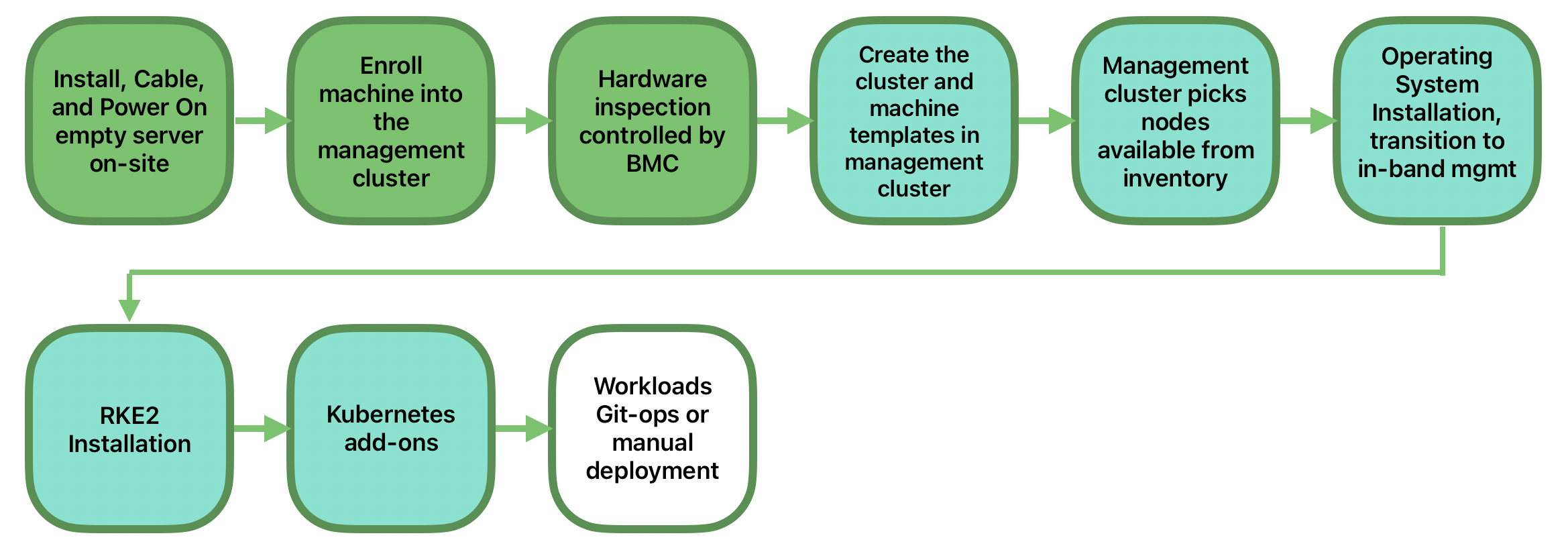
There are two different steps to automate the provisioning of a single-node downstream cluster using directed network provisioning:
Enroll the bare-metal host to make it available for the provisioning process.
Provision the bare-metal host to install and configure the operating system and the Kubernetes cluster.
Enroll the bare-metal host
The first step is to enroll the new bare-metal host in the management cluster to make it available to be provisioned.
To do that, the following file (bmh-example.yaml) has to be created in the management cluster, to specify the BMC credentials to be used and the BaremetalHost object to be enrolled:
apiVersion: v1
kind: Secret
metadata:
  name: example-demo-credentials
type: Opaque
data:
  username: ${BMC_USERNAME}
  password: ${BMC_PASSWORD}
---
apiVersion: metal3.io/v1alpha1
kind: BareMetalHost
metadata:
  name: example-demo
  labels:
    cluster-role: control-plane
spec:
  architecture: x86_64
  online: true
  bootMACAddress: ${BMC_MAC}
  rootDeviceHints:
    deviceName: /dev/nvme0n1
  bmc:
    address: ${BMC_ADDRESS}
    disableCertificateVerification: true
    credentialsName: example-demo-credentials
where:
${BMC_USERNAME}— The user name for theBMCof the new bare-metal host.${BMC_PASSWORD}— The password for theBMCof the new bare-metal host.${BMC_MAC}— TheMACaddress of the new bare-metal host to be used.${BMC_ADDRESS}— TheURLfor the bare-metal hostBMC(for example,redfish-virtualmedia://192.168.200.75/redfish/v1/Systems/1/). To learn more about the different options available depending on your hardware provider, check the following link.

Architecture must be either
x86_64oraarch64, depending on the architecture of the bare-metal host to be enrolled.If no network configuration for the host has been specified, either at image build time or through the
BareMetalHostdefinition, an autoconfiguration mechanism (DHCP, DHCPv6, SLAAC) will be used. For more details or complex configurations, check the Chapter 54, Advanced Network Configuration.
Once the file is created, the following command has to be executed in the management cluster to start enrolling the new bare-metal host in the management cluster:
$ kubectl apply -f bmh-example.yamlThe new bare-metal host object will be enrolled, changing its state from registering to inspecting and available. The changes can be checked using the following command:
$ kubectl get bmhThe BaremetalHost object is in the registering state until the BMC credentials are validated. Once the credentials are validated, the BaremetalHost object changes its state to inspecting, and this step could take some time depending on the hardware (up to 20 minutes). During the inspecting phase, the hardware information is retrieved and the Kubernetes object is updated. Check the information using the following command: kubectl get bmh -o yaml.
Provision step
Once the bare-metal host is enrolled and available, the next step is to provision the bare-metal host to install and configure the operating system and the Kubernetes cluster.
To do that, the following file (capi-provisioning-example.yaml) has to be created in the management-cluster with the following information (the capi-provisioning-example.yaml can be generated by joining the following blocks).
Only values between $\{…\} must be replaced with the real values.
The following block is the cluster definition, where the networking can be configured using the pods and the services blocks. Also, it contains the references to the control plane and the infrastructure (using the Metal3 provider) objects to be used.
apiVersion: cluster.x-k8s.io/v1beta2
kind: Cluster
metadata:
  name: single-node-cluster
  namespace: default
  labels:
    cluster-api.cattle.io/rancher-auto-import: "true"
spec:
  clusterNetwork:
    pods:
      cidrBlocks:
        - 192.168.0.0/18
        - fd00:bad:cafe::/48
    services:
      cidrBlocks:
        - 10.96.0.0/12
        - fd00:bad:bad:cafe::/112
  controlPlaneRef:
    apiGroup: controlplane.cluster.x-k8s.io
    kind: RKE2ControlPlane
    name: single-node-cluster
  infrastructureRef:
    apiGroup: infrastructure.cluster.x-k8s.io
    kind: Metal3Cluster
name: single-node-clusterBoth single-stack and dual-stack deployments are possible, remove the IPv6 CIDRs from the above definition for an IPv4 only cluster.
Single-stack IPv6 deployments are in tech preview status and not yet officially supported.
Adding the label
cluster-api.cattle.io/rancher-auto-import: "true"to thecluster.x-k8s.ioobjects will import the cluster into Rancher (by creating a correspondingclusters.management.cattle.ioobject). See the Cluster API documentation for more information.
The Metal3Cluster object specifies the control-plane endpoint (replacing the ${DOWNSTREAM_CONTROL_PLANE_IPV4}) to be configured and the cloudProviderEnabled flag set to false because a bare-metal node is used.
apiVersion: infrastructure.cluster.x-k8s.io/v1beta2
kind: Metal3Cluster
metadata:
  name: single-node-cluster
  namespace: default
spec:
  controlPlaneEndpoint:
    host: ${DOWNSTREAM_CONTROL_PLANE_IPV4}
    port: 6443
  cloudProviderEnabled: false
The RKE2ControlPlane object specifies the control-plane configuration to be used and the Metal3MachineTemplate object specifies the control-plane image to be used.
Also, it contains the information about the number of replicas required (in this case, one) and the CNI plug-in to use (in this case, Cilium).
The agentConfig block contains the Ignition format to be used and the additionalUserData to be used to configure the RKE2 node with information like a systemd unit service named rke2-preinstall.service to replace automatically the PROVIDERID and node-name during the provisioning process using the Ironic information. The configuration required for the RKE2 (Traefik based) ingress controller is also included, together the MetalLB custom resources (IPAddressPool and L2Advertisement) instance manifests required to externally expose the Ingress service through the ${INGRESS_IPV4} and ${INGRESS_IPV6} Virtual IPs.
The last block of information contains the Kubernetes version to be used. ${RKE2_VERSION} is the version of RKE2 to be used replacing this value (for example, v1.36.3+rke2r1).
apiVersion: controlplane.cluster.x-k8s.io/v1beta2
kind: RKE2ControlPlane
metadata:
  name: single-node-cluster
  namespace: default
  annotations: {
    rke2.controlplane.cluster.x-k8s.io/load-balancer-exclusion: "true"
  }
spec:
  machineTemplate:
  infrastructureRef:
    apiGroup: infrastructure.cluster.x-k8s.io
    kind: Metal3MachineTemplate
    name: single-node-cluster-controlplane
  replicas: 1
  version: ${RKE2_VERSION}
  rolloutStrategy:
    type: "RollingUpdate"
    rollingUpdate:
      maxSurge: 0
  serverConfig:
    cni: cilium
  agentConfig:
    format: ignition
    additionalUserData:
      config: |
        variant: fcos
        version: 1.4.0
        systemd:
          units:
          - name: rke2-preinstall.service
            enabled: true
            contents: |
              [Unit]
              Description=rke2-preinstall
              Wants=network-online.target
              Before=rke2-install.service
              ConditionPathExists=!/run/cluster-api/bootstrap-success.complete
              [Service]
              Type=oneshot
              User=root
              ExecStartPre=/bin/sh -c "mount -L config-2 /mnt"
              # Note we use _ as a delimiter for sed here because the providerid includes / characters
              ExecStart=/bin/sh -c "sed -i \"s_PROVIDERID_$(jq -r .providerid /mnt/openstack/latest/meta_data.json)_\" /etc/rancher/rke2/config.yaml"
              ExecStart=/bin/sh -c "echo \"node-name: $(jq -r .name /mnt/openstack/latest/meta_data.json)\" >> /etc/rancher/rke2/config.yaml"
              ExecStart=/bin/sh -c "echo \"node-label:\" >> /etc/rancher/rke2/config.yaml"
              ExecStart=/bin/sh -c "echo \"  - metal3.io/uuid=$(jq -r .uuid /mnt/openstack/latest/meta_data.json)\" >> /etc/rancher/rke2/config.yaml"
              ExecStartPost=/bin/sh -c "umount /mnt"
              [Install]
              WantedBy=multi-user.target
        storage:
          directories:
          - path: /var/lib/rancher/rke2/server/manifests
            overwrite: true
          files:
          - path: /var/lib/rancher/rke2/server/manifests/rke2-traefik-config.yaml
            overwrite: true
            contents:
              inline: |
                apiVersion: helm.cattle.io/v1
                kind: HelmChartConfig
                metadata:
                  name: rke2-traefik
                  namespace: kube-system
                spec:
                  valuesContent: |-
                    ingressClass:
                      isDefaultClass: true
                    ports:
                      web:
                        hostPort: null    # disallow hostPort
                        exposedPort: 80
                      websecure:
                        hostPort: null    # disallow hostPort
                        exposedPort: 443
                    service:
                      enabled: true
                      spec:
                        type: LoadBalancer
                        externalTrafficPolicy: Local
                        allocateLoadBalancerNodePorts: false
            mode: 0644
            user:
              name: root
            group:
              name: root
          - path: /var/lib/rancher/rke2/server/manifests/metallb-traefik-cr.yaml
            overwrite: true
            contents:
              inline: |
                apiVersion: metallb.io/v1beta1
                kind: IPAddressPool
                metadata:
                  name: ingress-ippool
                  namespace: metallb-system
                spec:
                  addresses:
                    - ${INGRESS_IPV4}/32
                    - ${INGRESS_IPV6}/128
                  serviceAllocation:
                    priority: 100
                    serviceSelectors:
                    - matchExpressions:
                      - {key: app.kubernetes.io/name, operator: In, values: [rke2-traefik]} # assign to rke2-traefik LB svc
                ---
                apiVersion: metallb.io/v1beta1
                kind: L2Advertisement
                metadata:
                  name: ingress-l2-adv
                  namespace: metallb-system
                spec:
                  ipAddressPools:
                    - ingress-ippool
            mode: 0644
            user:
              name: root
            group:
              name: root
    kubelet:
      extraArgs:
      - provider-id=metal3://PROVIDERID
    nodeName: "localhost.localdomain"
The Metal3MachineTemplate object specifies the following information:
The
dataTemplateto be used as a reference to the template.The
hostSelectorto be used matching with the label created during the enrollment process.The
imageto be used as a reference to the image generated usingEIBon the previous section (Chapter 50, Prepare downstream cluster image for connected scenarios), and thechecksumandchecksumTypeto be used to validate the image.
apiVersion: infrastructure.cluster.x-k8s.io/v1beta2
kind: Metal3MachineTemplate
metadata:
  name: single-node-cluster-controlplane
  namespace: default
spec:
  template:
    spec:
      dataTemplate:
        name: single-node-cluster-controlplane-template
      hostSelector:
        matchLabels:
          cluster-role: control-plane
      image:
        checksum: http://imagecache.local:8080/eibimage-output-telco.raw.sha256
        checksumType: sha256
        diskFormat: raw
        url: http://imagecache.local:8080/eibimage-output-telco.raw
The Metal3DataTemplate object specifies the metaData for the downstream cluster.
apiVersion: infrastructure.cluster.x-k8s.io/v1beta2
kind: Metal3DataTemplate
metadata:
  name: single-node-cluster-controlplane-template
  namespace: default
spec:
  clusterName: single-node-cluster
  metaData:
    objectNames:
    - key: name
      object: machine
    - key: local-hostname
      object: machine
    - key: local_hostname
      object: machine
Once the file is created by joining the previous blocks, the following command must be executed in the management cluster to start provisioning the new bare-metal host:
$ kubectl apply -f capi-provisioning-example.yaml